
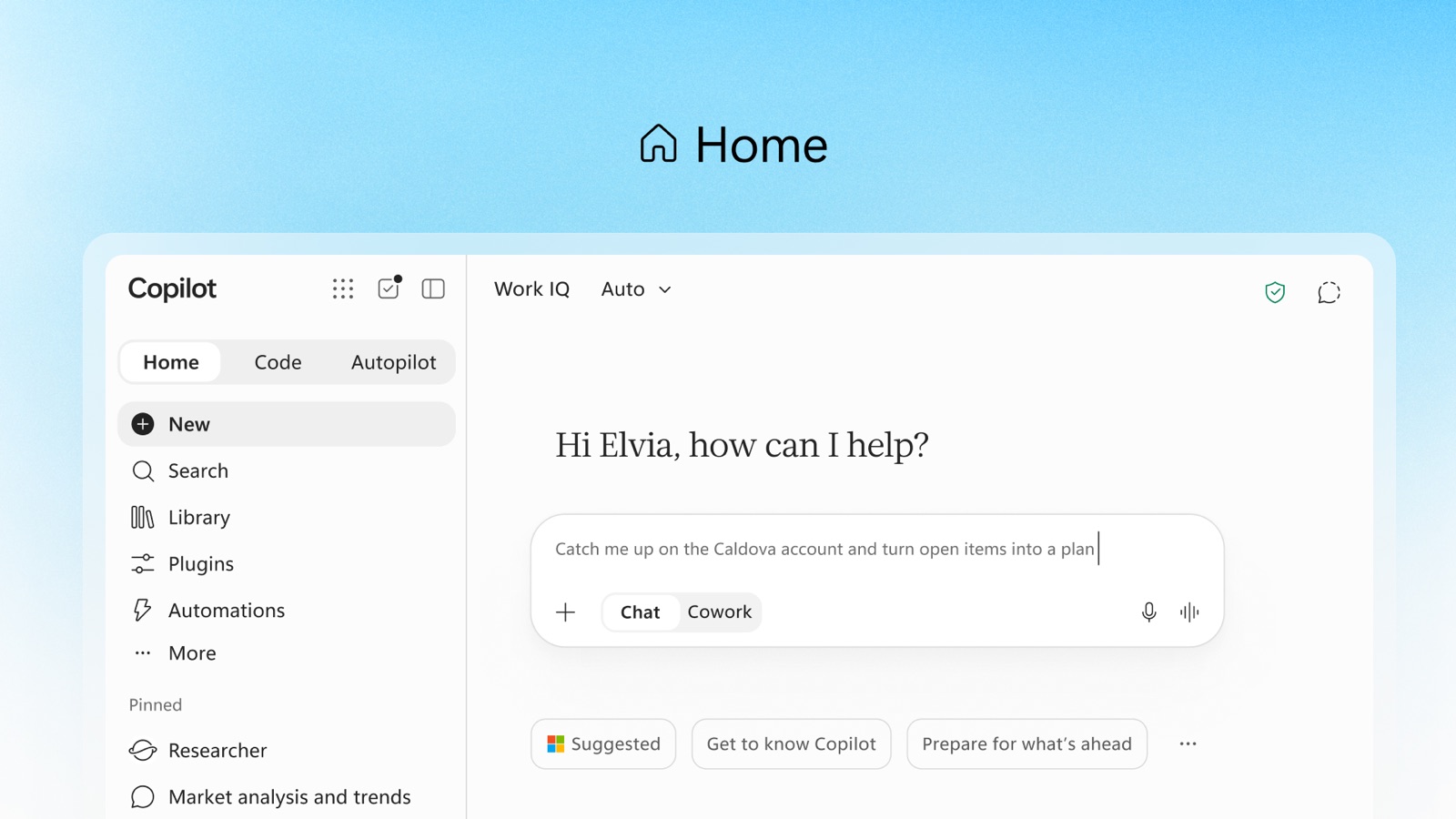
On 25 September 2026, Microsoft announced a reshaped Copilot built around three tabs: Home, Code, and Autopilot. Alongside it, the Copilot Studio team announced Copilot Managed Runtime, a Microsoft-hosted and governed place to run the code Copilot creates.
Most of my work takes a code first approach: data platforms on Fabric, agents on Foundry, and the pipelines, tests, and reviews that get them safely into production. Code caught my eye for a slightly different reason than it might for a business user. Can something built from a prompt sit comfortably next to the engineering processes we have spent years refining?
Put another way, the comparison isn't AI versus no AI. New services are already built with AI coding assistants in the loop, so the difference is whether AI works inside an engineering system, or whether AI acts as the engineering system.
I haven't had hands-on time with Code yet, so this is a first look based on the announcements, Microsoft Learn, and the public GitHub repository rather than a deep dive. I'll follow up once I've built something with it.
What is new
Both announcements are worth reading in full. These are the main changes:
- Code turns a plain language description of an app, tracker, dashboard, or workflow into a working result, from desktop widgets to cloud hosted apps shared with a team. It uses the same underlying technology as GitHub Copilot.
- Grounding comes from work context through Microsoft IQ, with Fabric IQ coming to Code through Frontier.
- Copilot Managed Runtime runs apps built in Cowork, Code, and Copilot Studio inside the Microsoft 365 tenant, with Entra sign in, DLP, connector policies, and Git based version control applied by default.
- Open build, managed run. An SDK and CLI let tools such as Lovable, Claude Code, and GitHub Copilot deploy to the same runtime, starting from a React, TypeScript, and Vite template (see the Managed Apps repository).
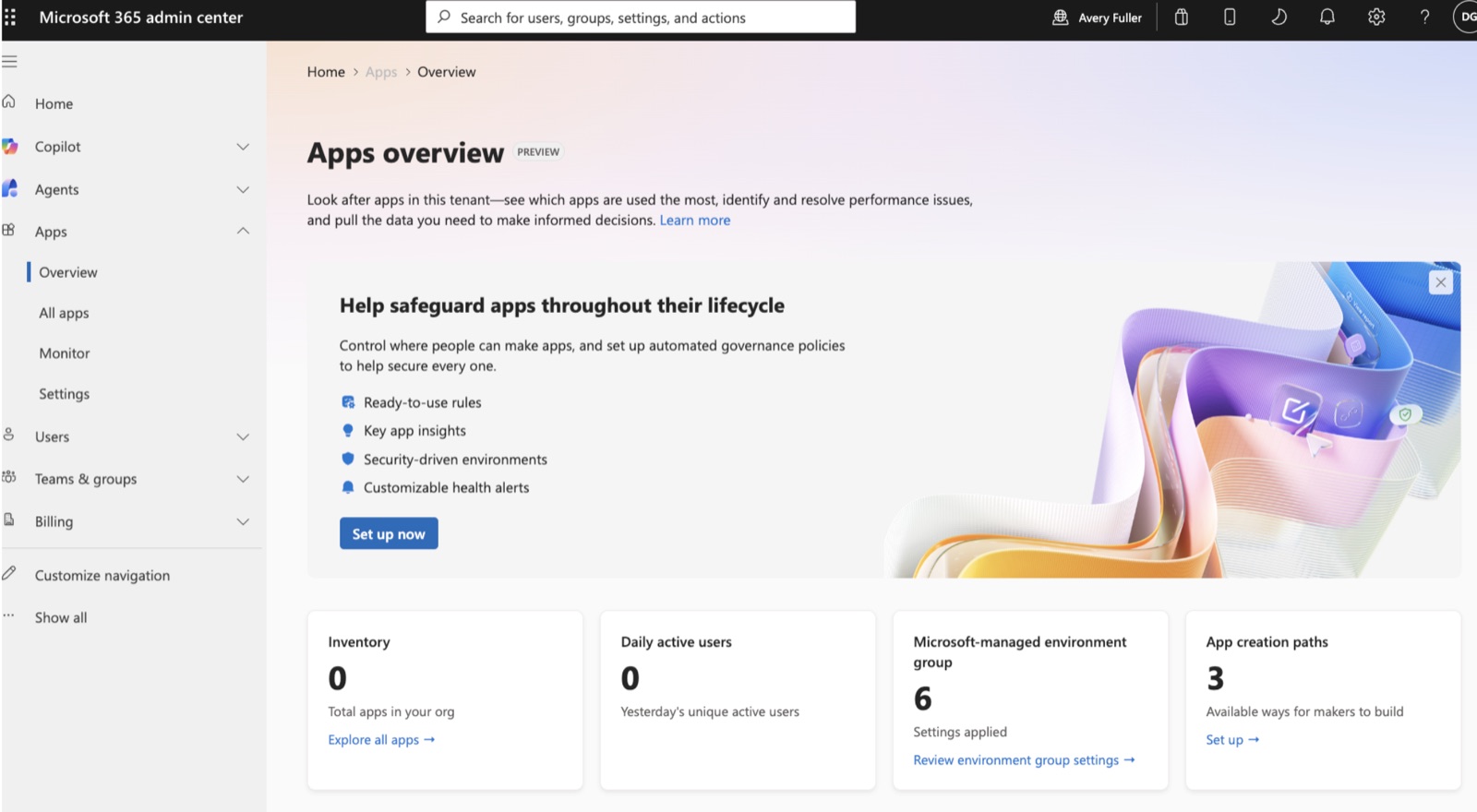
- Admin visibility through a new Apps page in the Microsoft 365 admin center (Microsoft Learn overview).
- Billing through Copilot Credits, for both building and running apps.
Code is rolling out to Frontier customers first, with a wider rollout to follow, and the runtime is in public preview. Expect things to change before general availability.
Modern pro code compared with Copilot Code
Today, a new service will typically be built alongside AI coding assistants, start from a template with infrastructure as code, deploy through a CI/CD pipeline, and be running in a dev environment the same day. Below, that path sits next to Copilot Code, stage by stage. The tools named are examples only; your stack will vary, but the practices are what matter.
I'll use two examples, starting with a simple one. Say a delivery team wants a tracker for AI use case requests: an intake form, a list with a status field, and a summary view for the steering group, all reading from a SharePoint list.
Design and build
- Modern pro code: short refinement and a lightweight design, then a developer steering GitHub Copilot or Claude Code in the IDE.
- Copilot Code: a prompt; Copilot chooses the approach and writes the code.
Infrastructure and identity
- Modern pro code: Terraform or Bicep from a template, managed identity, no secrets.
- Copilot Code: provided, including hosting, Entra sign in, and connector policy.
Source control
- Modern pro code: your own repo in GitHub or Azure DevOps, with branching and review policy under your control.
- Copilot Code: platform managed Git by default, or your own GitHub Enterprise Cloud repo; fixed at creation.
Review, testing, and scanning
- Modern pro code: human approval and tests in CI; CodeQL, Dependabot, and secret scanning on every pull request.
- Copilot Code: platform build and scan, CSP headers, DLP; branch policies and pull request reviews apply only with a GitHub Enterprise Cloud repo; no test gates documented.
Release
- Modern pro code: GitHub Actions with OIDC and environment approvals across dev, test, and prod.
- Copilot Code: deploy to the app's single environment; preview a commit before deploying; no promotion between environments.
Operations
- Modern pro code: Application Insights, alerting, a named owner.
- Copilot Code: usage, health, and custom alert rules in the admin center; the app lives in the maker's personal developer environment.
For this tracker, Copilot Code is well positioned. Even with a good template, the pro code path adds a repo, a pipeline, and an Azure subscription (or other infrastructure components) to look after for a low-risk internal tool. The runtime handles identity, hosting, and connector policy that a business user would otherwise get wrong or skip.
Now a more demanding example. A procurement team wants a supplier onboarding app. Suppliers upload documents, a Foundry agent extracts bank details and certifications, a reviewer approves, and the app writes the new supplier into the ERP. Around 300 people rely on it, and it sits inside financial audit scope. Walking the same stages, the balance tips quickly:
- Design: extraction, approval, and write back each need explicit decisions on retries, duplicate submissions, and what happens when the agent is unsure. A prompt won't surface those; a design session will.
- Security: this app handles bank details. DLP limits what data an app can reach, and the platform scans the build, but neither tells you whether a flawed authorisation check lets someone approve their own supplier. Veracode's 2025 GenAI Code Security Report found OWASP Top 10 style flaws in 45% of the AI generated code samples it tested, which is why human review needs to be enforced rather than optional.
- Testing: an ERP write back needs integration tests against a test environment, plus regression tests on the agent's extraction accuracy.
- Release and audit: auditors will ask who approved each change and what evidence shows it was tested. The audit log records who deployed and when, but not the code change behind the deploy, and the runtime has no approval step to record. Environment approvals and pipeline history do.
- Operations: if onboarding stops, supplier payments stop. The admin center can alert on health, but an alert needs an accountable owner to act on it, and the app lives in whichever developer environment its maker happened to have.
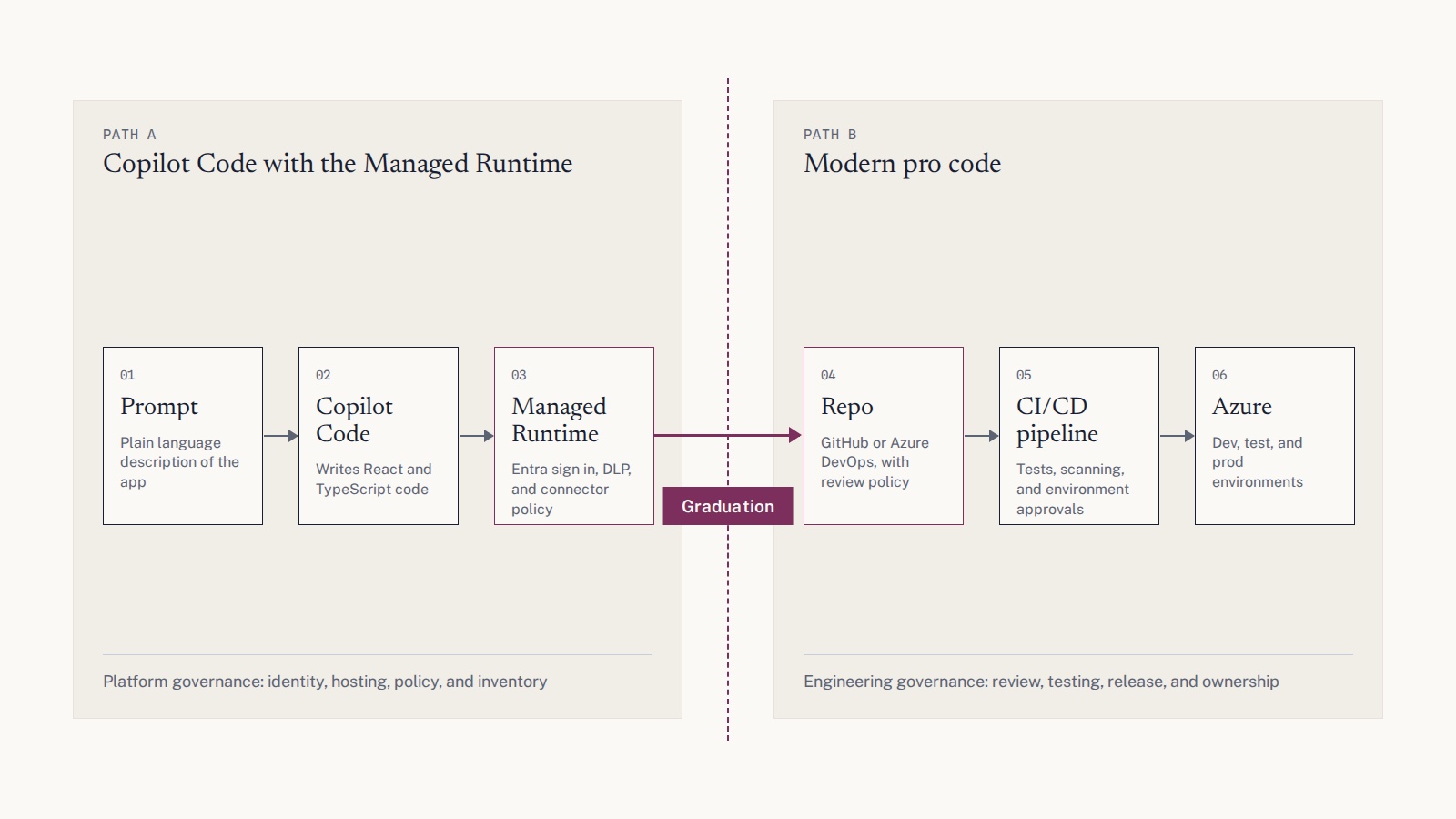
For this app I'd choose modern pro code without much hesitation. Copilot Code could still earn its place building a first prototype to validate the flow with the procurement team, but the production version demands a different approach. In practice, any technical owner responsible for architecting or building something like this in production will default to known, well established engineering practices, and rightly so. The diagram below shows what a graduated path may look like, but I'd anticipate that if much of the production path is using established engineering practices, it's likely that some teams and organisations will build (or individual use cases will be built) end to end using typical pro code practices.
What works well
- Governance at the point of creation. Apps are born inside the tenant with Entra, DLP, and Content Security Policy headers already applied. Compared with citizen built apps hosted on personal accounts outside the tenant, that is a big step forward.
- Code a developer can pick up. Every app lives in a Git repo that can be cloned (or in your own GitHub Enterprise Cloud repo from day one), and the code is React and TypeScript rather than a proprietary formula language. Any developer can review it, harden it, or take it over entirely, which gives a realistic graduation path. This is the detail that matters most to me.
- The pro code experience isn't locked out. Being able to build with GitHub Copilot or Claude Code locally and deploy through the CLI to the same governed runtime is a sensible "open build, managed run" model.
- One inventory for IT. Knowing what exists, who owns it, and whether anyone uses it is the first problem to solve with shadow IT, and it's solved here by default.
What's likely to cause difficulty in production
Everything is in preview, so some of these may well be addressed before general availability. Based on what Microsoft has published so far, these are the areas I'd expect to cause friction as a Copilot Code app moves towards production.
Quality gates depend on where the code lives
Every app is bound to a repository when it's created, and the choice can't be changed afterwards. Bind a CLI built app to a GitHub Enterprise Cloud repo and the platform builds, scans, and deploys from there, with your branch policies and pull request reviews still applying. Apps built in Code, Cowork, or Copilot Studio, and anything on a platform managed repo, get none of that by default, and Azure DevOps isn't supported as a repo host. I'd like admins to be able to require a GitHub backed repo, or a review, before an app is shared beyond a set number of users. That one control would close much of the gap in the comparison above.
One environment per app, and the pipeline path gives up platform checks
ms app deploy targets the environment the app is bound to, so moving from test to production means a second app or your own pipeline. GitHub Actions is documented, but it authenticates with a service principal client secret rather than federated credentials, needs an admin to enable external artifact deployment (off by default), and skips the platform build and scan, leaving your organisation responsible for validating the artifact and securing the pipeline.
Ownership over time
Apps are created in the maker's personal developer environment. Those are managed environments with an inactivity clock: 60 days without activity and the environment is disabled, 15 days later it's deleted, with warnings along the way. That covers the "nobody has opened it in six months" case. It doesn't cover the "owner leaves" case: an app people still use keeps its environment active, so it survives in a departed colleague's developer environment with nobody accountable for it.
Cost at scale
Running apps consumes Copilot Credits too, not just building them: each launch and each API call (0.1 credits per call) is charged. Users with Power Apps Premium are exempt, admins can set spending policies and limits per user or group, and uncovered users are blocked after 20 operations or five minutes. The forecasting problem remains: a popular app across a department is harder to budget than a fixed App Service plan.
Flexibility when choices change
Production systems outlive the decisions made at the start. With code you own, moving agent orchestration from LangGraph to Microsoft Agent Framework, or a front end from React to Vue, is a planned refactor on your own terms. The runtime is opinionated (a React, TypeScript, and Vite template, with identity and data access going through its SDK), so changing direction, or moving an app to App Service once it outgrows the runtime, is more likely to mean regenerating or reworking it. To be fair, a fixed stack also curbs sprawl, which many IT teams will welcome.
Audit and compliance evidence
Purview audits app creation, build, deploy, deletion, and launch, so you can see who deployed and when. A Git push isn't audited, so the code change behind a deploy isn't in the log, and the runtime has no approval step to record. For the supplier onboarding app, that's the gap an auditor would find first. Data residency, regional availability, and certification scope haven't been published.
My conclusion
I think Copilot Code and the Managed Runtime are an interesting step, and the runtime is the more important of the two announcements. Microsoft has done a good job on platform governance (identity, hosting, policy, inventory), but engineering governance (review, testing, release approval, ownership) is still largely left to the organisation, unless a developer bound the app to a GitHub Enterprise Cloud repo when it was created.
For now, my approach would be to treat it as a governed sandbox for low-risk internal tools, with clear graduation triggers. If an app gains external users, writes to a system of record, touches regulated data, or becomes business-critical, clone the repo into your standard pipeline and treat it like any other production application. Because the code is plain React and TypeScript in a repo you can clone, that graduation path is realistic rather than theoretical. For those workloads, custom code with proper CI/CD is still the best route, but the gap between the two is getting smaller.
Sources
Screenshots are from Microsoft. The Home screenshot comes from the Copilot announcement; the app inventory screenshot comes from the Managed Runtime announcement.
- Build apps, workflows, and agents together: September 2026 Copilot Studio update
- Introducing the new Copilot with Home, Code and Autopilot
- Build where you want, run with confidence: Copilot Managed Runtime
- Copilot Managed Runtime overview for admins (Microsoft Learn)
- Copilot Managed Runtime SDK overview (Microsoft Learn)
- Copilot Managed Runtime CLI command reference (Microsoft Learn)
- Deploy Copilot Managed Runtime apps with GitHub Actions (Microsoft Learn)
- Security and compliance for Copilot Managed Runtime (Microsoft Learn)
- FAQ about Copilot Managed Runtime (Microsoft Learn)
- Automatic deletion of Power Platform environments (Microsoft Learn)
- Managed Apps repository (GitHub)
- Veracode 2025 GenAI Code Security Report